


Bible Gateway
2.713.08K Reviews
App Specs
- Version
- 200.0.77
- Updated On
- License
- Free
- Downloads
- 1,000,000+
- Developer
- HarperCollins Christian Publishing
- Categories
- Books & Reference
- Platform
- Android
Screenshots
 Analysis by AppCompare
I think Bible Gateway is easiest to judge as a practical reading and reference tool rather than as a complete guide to every part of Christian life. It brings Bible reading, listening, and study into one app, which is useful when I want to look up a passage quickly or spend longer comparing how a verse is expressed. HarperCollins Christian Publishing develops it, and its Books & Reference focus is clear: scripture is the center, with supporting study material and ways to keep track of passages that matter to me.
What the current version is best at
The app is free to download, with optional in-app purchases priced from $3.99 to $49.99 per item. That makes it easy to try without paying up front, though I would check which resources are included before building a study routine around a particular paid item. Bible Gateway is rated for Everyone 10+, and it has reached over a million installs. Its average rating is 2.8 from around 40,000 ratings, so I would treat it as a useful option to test for myself rather than assume every reader will find it smooth or satisfying.
The current version is 7.0.26, while the app’s release history goes back to August 8, 2012. That long span suggests an established product, but it does not tell me by itself which features have changed or how the experience has improved over time. I would separate what I can see in the current app from what I might hope future updates will do: version numbers and longevity are context, not proof that every older complaint has been fixed.
How it fits into an ordinary day
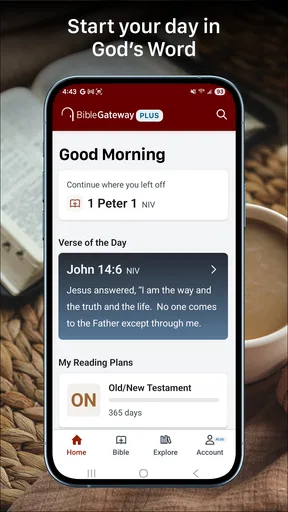
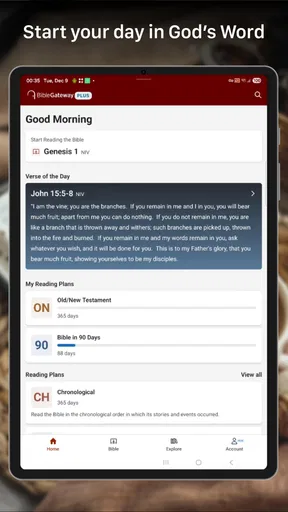
For a realistic routine, I might start the morning by opening a reading plan, then save a passage that I want to revisit during a break. Later, I can search for a phrase I remember imperfectly instead of paging through chapters, and in the evening I can listen when my eyes are tired. That mix is the app’s most convincing advantage: it lets one scripture habit move between reading, quick reference, and audio without requiring a separate tool for each step.
There is a useful distinction between searching for a familiar line and studying a passage carefully. A keyword search can help me locate a verse, but it is only a starting point; I still need to read the surrounding verses so I do not mistake a phrase for the whole argument. When comparing translations, I find it more helpful to keep the passage and its context in view than to treat a single wording difference as a final interpretation. The app can make that comparison convenient, but the judgment remains mine.
Who is likely to appreciate it
I would recommend it to readers who want scripture close at hand, people who switch between reading and listening, and anyone who often needs to find a passage by a remembered word or phrase. It can also suit someone beginning a regular reading habit, since a plan gives the day a clear next step and bookmarks or notes can make returning to a passage less cumbersome. If I were sharing a verse with a family member or a study group, having the passage available in the same place where I read it would be handy.
It may be less suitable for someone who wants a quiet, minimal reading screen with no interest in reference material, or for a reader who expects every resource to be free. The optional purchases matter if commentaries or other study resources are central to the way you plan to use it. I would also hesitate to make it my only study source: a digital search is convenient, but it cannot replace reading a complete passage, consulting trusted teachers, or checking the context behind a difficult verse.
Worth Reading Before You Choose

EA SPORTS FC Mobile 26 Is a Bigger Football Game, but It Takes Time

Flipboard Shows What News Apps Must Do Beyond the Feed

Switching to Android Auto Means Rethinking Your Driving Routine

Google Calendar Makes a Crowded Week Easier to Manage

Ludo King Makes the Most of the Minutes Between Plans

Baby Panda World Brings Quick Play to Modern Phones, but Its Game Library Feels Busy
Where it sits among Bible apps
Compared with a basic Bible reader, Bible Gateway is appealing when I want search, audio, study resources, and personal reading tools gathered in one place. A simpler reader may be a better fit if all I need is a clean page of text and a few saved passages. On the other hand, readers who prefer a tightly guided devotional experience may want an app built primarily around daily prompts and reflection rather than a broad scripture reference library. The right choice depends less on which app claims the most tools and more on whether its way of organizing reading matches the habit I can sustain.
One practical tip is to make a small, repeatable workflow instead of trying every feature at once: choose a plan, save only passages I genuinely want to revisit, and use search when I need to locate a remembered phrase. That keeps bookmarks useful rather than turning them into an unfiltered pile. If I am studying a passage with someone else, I would note the translation I am reading before sharing it, since wording can differ between versions and a shared quotation is clearer when everyone knows which text it comes from.
An All-in-One Spiritual Companion
First up, let's talk about the sheer convenience of the Bible Gateway app. This isn’t just any run-of-the-mill Bible app. Oh no, it's like having an entire library of biblical resources right in your pocket. Whether you’re at home, on the bus, or sipping a latte at your favorite coffee shop, your spiritual companion is just a tap away.
Vast Library of Translations
One of the standout features is the extensive collection of translations. We're talking over 200 different versions in dozens of languages. So, whether you prefer the classic King James Version or something a little more contemporary like the New International Version, Bible Gateway has got you covered. And for our friends who speak other languages, there are plenty of translations to choose from too.
Search and Study Tools
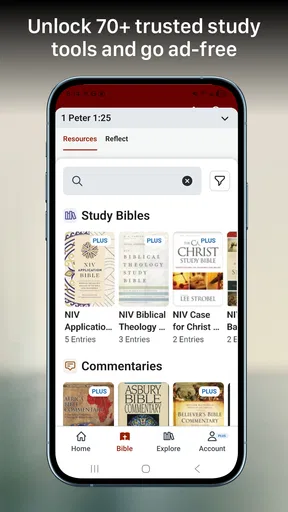
But wait, there's more! The search and study tools are a game changer. You can search for specific verses, keywords, or phrases, which is super handy if you’re trying to find that one verse that’s been on your mind all day. The app also offers insightful commentaries and devotionals. Perfect for when you want to dig a little deeper and get some context or guidance on how to apply scripture in your daily life.
Audio Bible for On-the-Go Listening
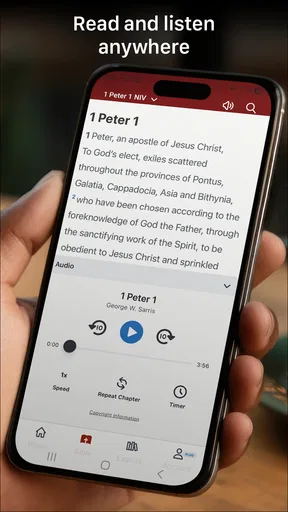
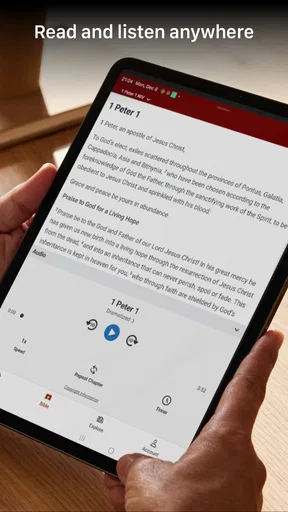
For those times when reading isn’t an option—like during your morning run or while driving—the audio Bible feature is an absolute lifesaver. You can listen to the scriptures being read aloud in various translations. It’s like having your own personal narrator bringing the Bible to life.
Personalized Experience
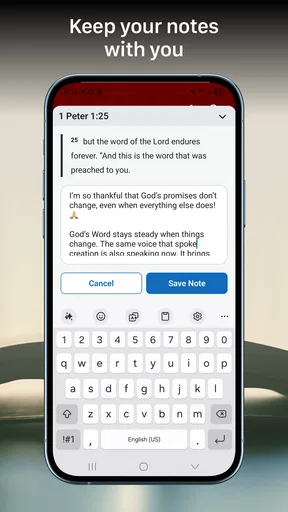
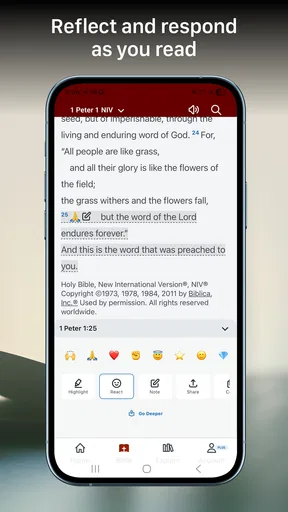
Now, let’s talk personalization. Bible Gateway allows you to highlight your favorite verses, create bookmarks, and even take notes. This makes it super easy to come back to those passages that really speak to you or that you want to remember for later. Plus, with the daily reading plans, you can set up a routine to ensure you’re getting your daily dose of scripture.
Intuitive User Interface
The user interface is intuitive and user-friendly, which is a big plus. No one wants to struggle with an app that’s supposed to make life easier, right? Navigating through the different features is a breeze, and everything is organized in a way that makes sense.
Accessibility and Sharing
Another neat thing is the ability to share verses or passages with friends and family. Whether it’s a quick text or a social media post, spreading a little bit of inspiration has never been easier. Plus, the app is accessible across multiple devices. So whether you’re on your phone, tablet, or computer, you can pick up right where you left off.
What I would check before settling in
For a new user, the first few minutes are best spent choosing a translation and trying a search for a phrase you already know. That quickly shows whether the wording feels comfortable and whether the results make it easy to open the surrounding passage. I would then test a reading plan and save one bookmark, rather than immediately adding lots of notes. This is a low-effort way to see whether the app’s organization suits me before I depend on it for a longer routine.
Readers who are new to the Bible may wonder whether they need to understand the whole library before starting. I do not think so. A familiar translation and a manageable plan are enough to begin; commentary can be useful when a passage raises questions, but it is not necessary to consult a resource after every paragraph. For a group discussion, I would use search to locate the text, then read the passage as a whole and bring questions to the group rather than treating a short note as the last word.
Trade-offs for listening and saved material
Audio is particularly useful when my hands or eyes are occupied, but it changes the way I pay attention. If I am walking or doing chores, I may catch the broad movement of a chapter while missing a detail that would stand out on the page. I would use listening for continuity and convenience, then return to the written text when I want to compare wording or take notes. That small switch makes the audio option complementary rather than a substitute for careful reading.
Bookmarks, highlights, and notes can make a personal library of useful passages, but they only help if I can find things again. I would use a consistent note style, such as a short reminder of why I saved a passage, rather than writing a long reflection every time. For example, a few words about a question to revisit can be more searchable in my own memory than a vague highlight with no context. This is a simple habit, but it makes the personalization tools more useful over weeks of reading.
Limits worth keeping in mind
The rating is a caution worth noticing, not a verdict on every person’s experience. A lower average can reflect friction that matters to some readers and not others, so I would try the app with my own phone, reading habits, and preferred translation before committing to it as my main reference. If I mainly want a distraction-free page, or if I need a resource that works in a very specific way, trying a simpler alternative alongside it is sensible.
It is also worth being deliberate about what “study” means to me. Search, notes, translations, and commentaries can support a thoughtful reading, but they do not automatically provide scholarly depth or settle disagreements about interpretation. When accuracy and context matter, I would compare the full passage, check the translation, and consult more than one trusted source. Bible Gateway is most helpful as a convenient starting point and companion, not as an authority that removes the need for judgment.
How its long history affects the choice
Because the app has been available since 2012 and now carries version 7.0.26, existing users may find it familiar while new users arrive to a product with a long life behind it. I would not assume that age alone means the current interface will suit everyone, or that a newer version necessarily changed a particular tool. What matters to me is whether the present reading, search, audio, and saving workflow works reliably for the way I use it. If an update changes an interface detail, I would reassess that workflow rather than rely on memories of an older version.
For readers already using it, a useful check is whether saved habits still serve their purpose: are reading plans manageable, are bookmarks easy to revisit, and is listening genuinely helping? If not, simplifying the routine may help more than adding another tool. For a newcomer, the same questions make a fair trial: try a short stretch of reading, one search, and one listening session, then decide based on actual use. Future updates may bring changes, but I would treat those as expectations until they are visible in the app.
A thoughtful fit, not a universal one
Overall, I see Bible Gateway as a flexible choice for someone who wants a Bible reference app with several ways to engage with scripture and enough personal tools to build a routine. It is less compelling if the priority is an uncluttered reader, if paid resources are essential but outside your budget, or if you want guided teaching to do most of the interpretive work. Those are not flaws for every reader; they are reasons to match the app to the job you actually want it to do.
In a nutshell, Bible Gateway is a solid choice for anyone looking to explore the Bible in a comprehensive and convenient way. Whether you’re a seasoned reader or just starting your spiritual journey, this app has something to offer. Give it a whirl—you might just find it to be the perfect companion on your path.
Pros
- Extensive library of translations.
- User-friendly search feature.
- Daily reading plans available.
- Audio versions for hands-free use.
- Offline access to saved content.
Cons
- Contains ads in free version.
- Limited offline translations.
- Requires registration for notes.
- Audio requires internet connection.
- No community or discussion forum.
FAQs for Bible Gateway
What is the Bible Gateway app used for?
Bible Gateway is a comprehensive platform for reading, searching, and studying the Bible in various translations. It offers features such as audio Bibles, daily reading plans, and the ability to highlight and bookmark verses. Suitable for both casual reading and in-depth study, it's a versatile tool for anyone interested in exploring the scriptures.
Is the Bible Gateway app free to use?
Yes, the Bible Gateway app is free to download and offers access to a wide range of Bible translations and resources at no cost. However, there is a premium option, Bible Gateway Plus, which provides additional features such as ad-free access and expanded study resources. Subscriptions for premium features are available through in-app purchases.
What versions of the Bible are available on Bible Gateway?
Bible Gateway offers access to over 200 Bible versions in more than 70 languages. Popular translations include the New International Version (NIV), King James Version (KJV), and English Standard Version (ESV). This extensive selection allows users to compare different translations and find the one that best suits their study needs.
Does the Bible Gateway app require an internet connection?
While an internet connection is required to access certain features, like online resources and streaming audio Bibles, the app does offer the option to download specific Bible versions for offline reading. This ensures that users can access the scriptures even when they are not connected to the internet, making it convenient for on-the-go study.
Can I customize my reading experience on Bible Gateway?
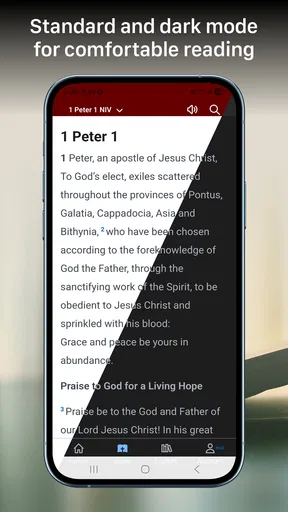
Yes, Bible Gateway offers several customization options to enhance your reading experience. Users can adjust font sizes, switch to a dark mode for easier reading at night, and organize bookmarks and highlights. These features allow users to tailor the app to their personal reading preferences and make studying the Bible more comfortable.


